
RPG Makerのレビューツール:物語の文脈に沿って翻訳
RPG Makerの翻訳をテーブル、マップ、時系列で確認できます。フローチャートで選択肢を確認し、会話を比較して、文脈に沿って編集できます。
ガイドを見るLRPGM · Windows
フローチャート付きのレビューツール、プラグイン分析、簡易・プロモードなど、RPG Makerゲームを翻訳するためのLRPGMの機能を紹介します。
候補ごとに信頼度、出所、検出された使用箇所を確認できます。自動選択された項目と、判断が必要な項目をチェックしてください。
ガイドを見る構造化リソース処理を使って、TXT、CSV、カスタムJSONのテキストを対象にできます。操作機能と上限はプランおよびプロジェクトの構成に従います。
ガイドを見る処理時に変数や書式マーカーを扱い、テキスト内での役割を保ちます。適用前にレビューツールで会話文とコードを確認してください。
ガイドを見る認識されたゲームを追加し、ライブラリでプロジェクトを管理できます。FreeではMV/MZプロジェクトを最大5件まで有効にできます。
ガイドを見る処理前にファイルとグループを確認できます。BasicとPlusでは追加の制御機能が使えます。構造化リソースには個別の条件があります。
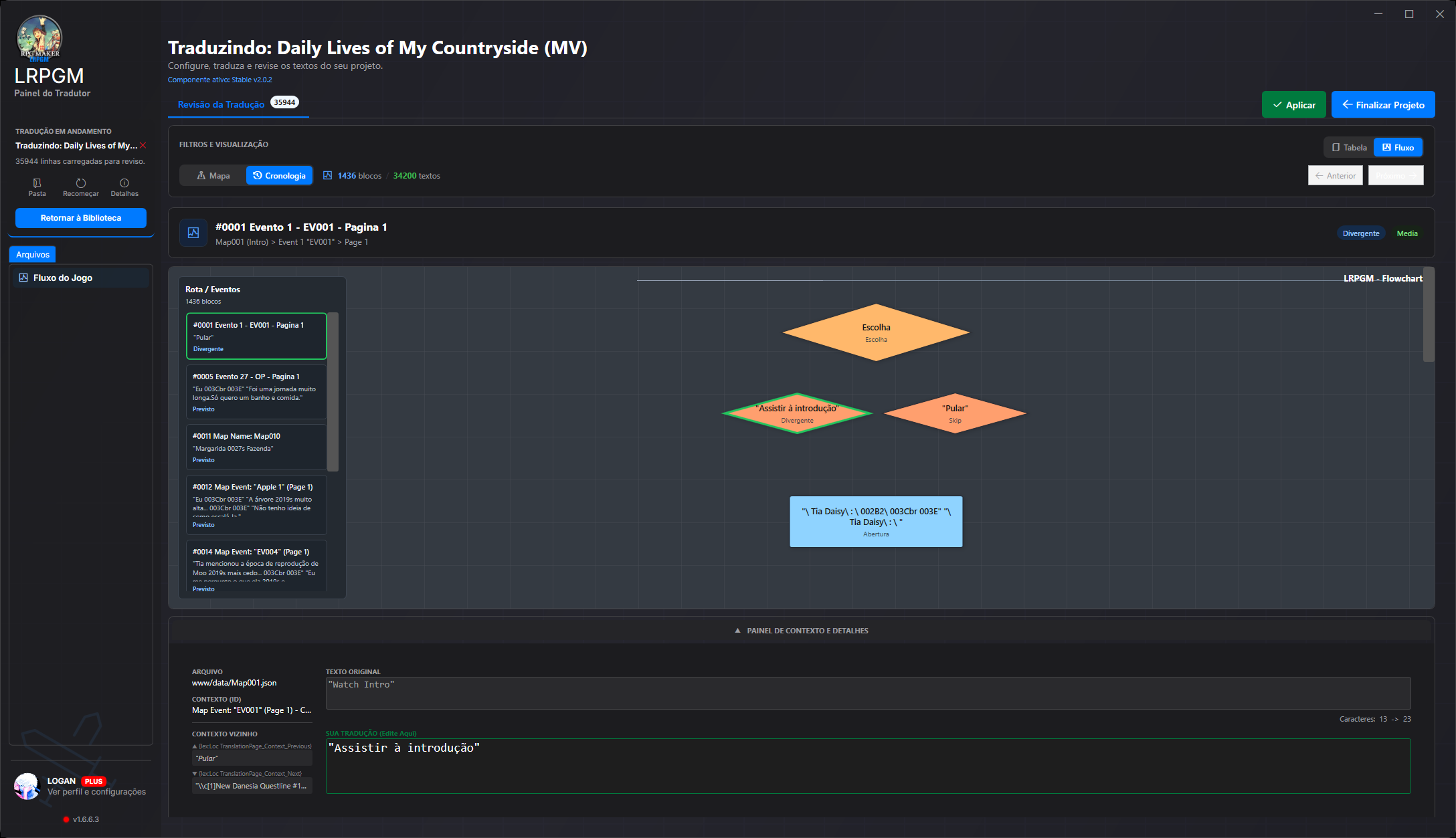
ガイドを見る原文と翻訳を比較し、マップから場面を探し、フローチャートで選択肢をたどれます。編集時も前後の会話が表示されるため、意味を保ちやすくなります。
ガイドを見るBasicとPlusでは用語集を使用できます。Basicでは2組まで有効にでき、各組に最大5件の自動ルールを設定できます。
ガイドを見るキャッシュとプロジェクトの状態に応じて結果を再利用できます。保存期間やファイルの変更は再開に影響することがあります。
ガイドを見る翻訳済みで破損のないMV/MZプロジェクトを、保護されていないソースでローカル共有できます。オンライン接続と有料のBasicまたはPlusアカウントが必要です。ホスティングや公開リンクは含まれません。
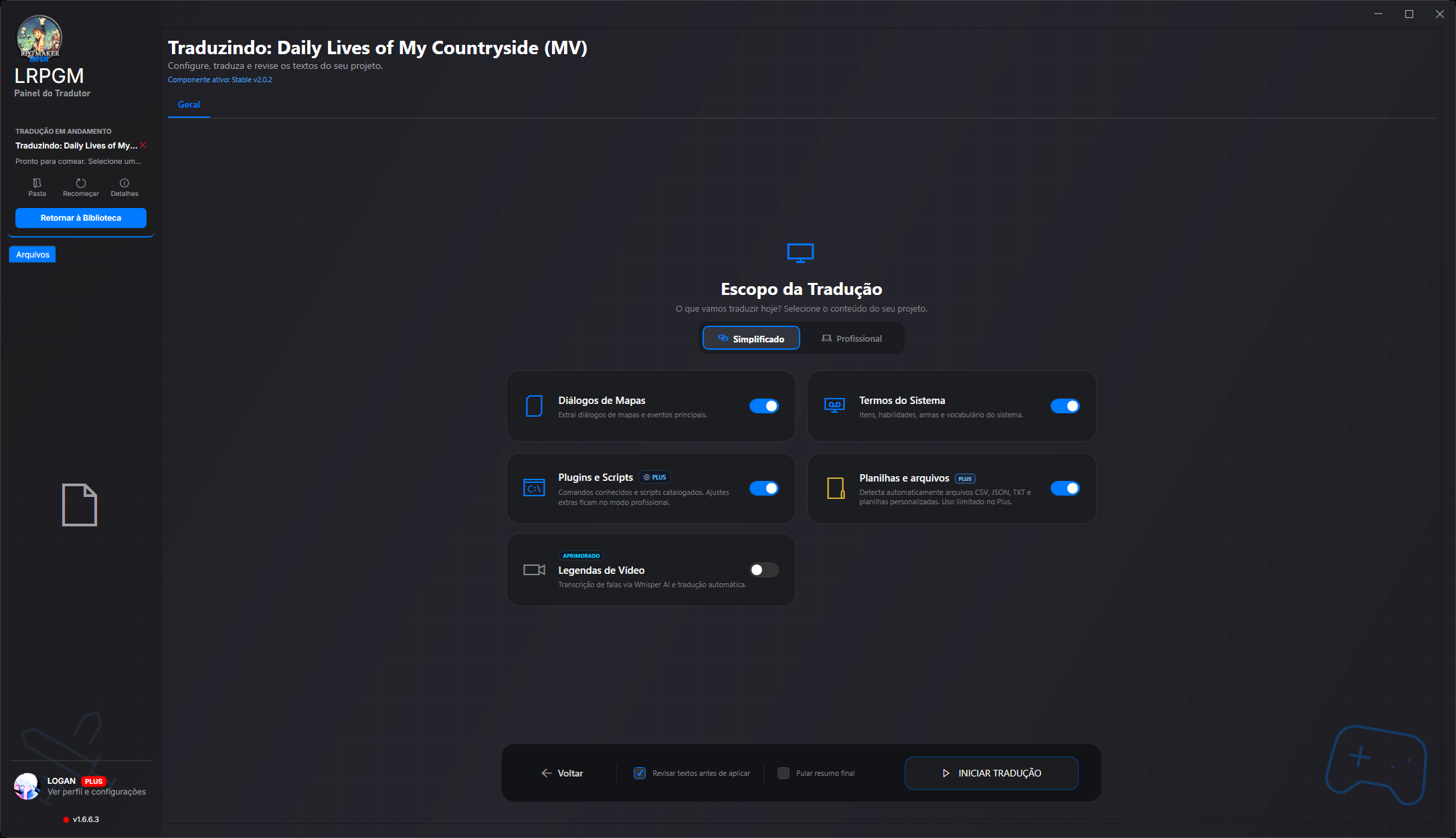
ガイドを見る簡易モードでは抽出元を選びやすいカテゴリにまとめます。プロモードではマップ、共通イベント、スクリプト、データベースの項目を設定できます。ステージパネルで抽出の進行を確認し、翻訳前に検出された言語のサンプルを確認できます。
詳細オプションはプランとプロジェクトによって異なります。使い方に合ったプランを比較して選びましょう。
Google V3 [LRPGM]とGoogle Oldはすべてのプランで利用できます。Bing、Azure、DeepLX、DeepL Free/Proにはオンライン接続のPlusが必要です。言語カタログが各プロバイダーの対応範囲を示すものではありません。
プロバイダーによっては、別途アカウント、キー、支払いが必要です。連携に第三者のクレジットは含まれず、すべての言語ペアに対応するとは限りません。
LRPGMは各世代のRPG Maker形式に対応したWindowsアプリです。テキストと文脈の確認に集中でき、ファイルの読み込みと翻訳の組み込みはアプリが処理します。
ゲームの構成に応じてマップ、イベント、データベース、プラグインを読み込みます。翻訳は別ファイルに保存され、プラグインを通じてLRPGMの実行環境に組み込まれます。
Ruby Marshalと.rxdata、.rvdata、.rvdata2形式を読み取ります。Legacy実行環境では専用ファイルに翻訳を保存し、認識されたRGSSアーカイブまたはスクリプトに組み込みます。
TXT、CSV、カスタムJSONの内容も抽出できます。プラグイン分析を使えば、RPG Maker標準の項目以外にあるプレイヤー向けテキストも見つけやすくなります。
認識されたEVBコンテナ内のMV/MZデータには仮想ファイルシステムを通じてアクセスします。RGSS形式とLegacyの経路には専用の処理があります。互換性はゲーム内の形式と構造によって異なります。
The reviewer brings together original text, translation, file, map, event and neighbouring text. Follow blocks in order or open the choice flowchart to understand what comes before and after each answer.
ガイドを見るIn MV/MZ, analysis follows text references and uses, separates candidates from technical values and shows a confidence score. High-confidence candidates can be preselected; inspect their origin, adjust filters and decide what to translate.
ガイドを見るRecognised variables, formatting codes and markers are protected before text reaches the translation service. LRPGM validates and restores these elements in the result, reducing manual command repairs.
ガイドを見るA plugin may use the same name for a button and an image or audio file. In MV/MZ, the resource corrector can recover the original name during loading using the file index and translation pairs. Images and audio retain their original file names.
ガイドを見るCreate a local package from an eligible MV/MZ project. Choose protected distribution, which blocks editing in LRPGM, or preserve review data for teamwork. Integrity checks detect changes to protected content; Plus lets you customise package credits and its icon.
ガイドを見るThe MV/MZ runtime provides a translation menu with font, size and line-wrapping options. In eligible modes, switch between original and translated text and adjust reading without returning to the editor. Free Runtime restricts these options.
ガイドを見るCoverage depends on the engine, plugins and plan. Resource reference correction needs a file index and a translation match; it does not recreate missing files. Local sharing requires a translated, intact MV/MZ project, an unprotected source and an online base paid Basic or Plus account. Editing protection does not prevent copying the package or replace the game author’s rights.