
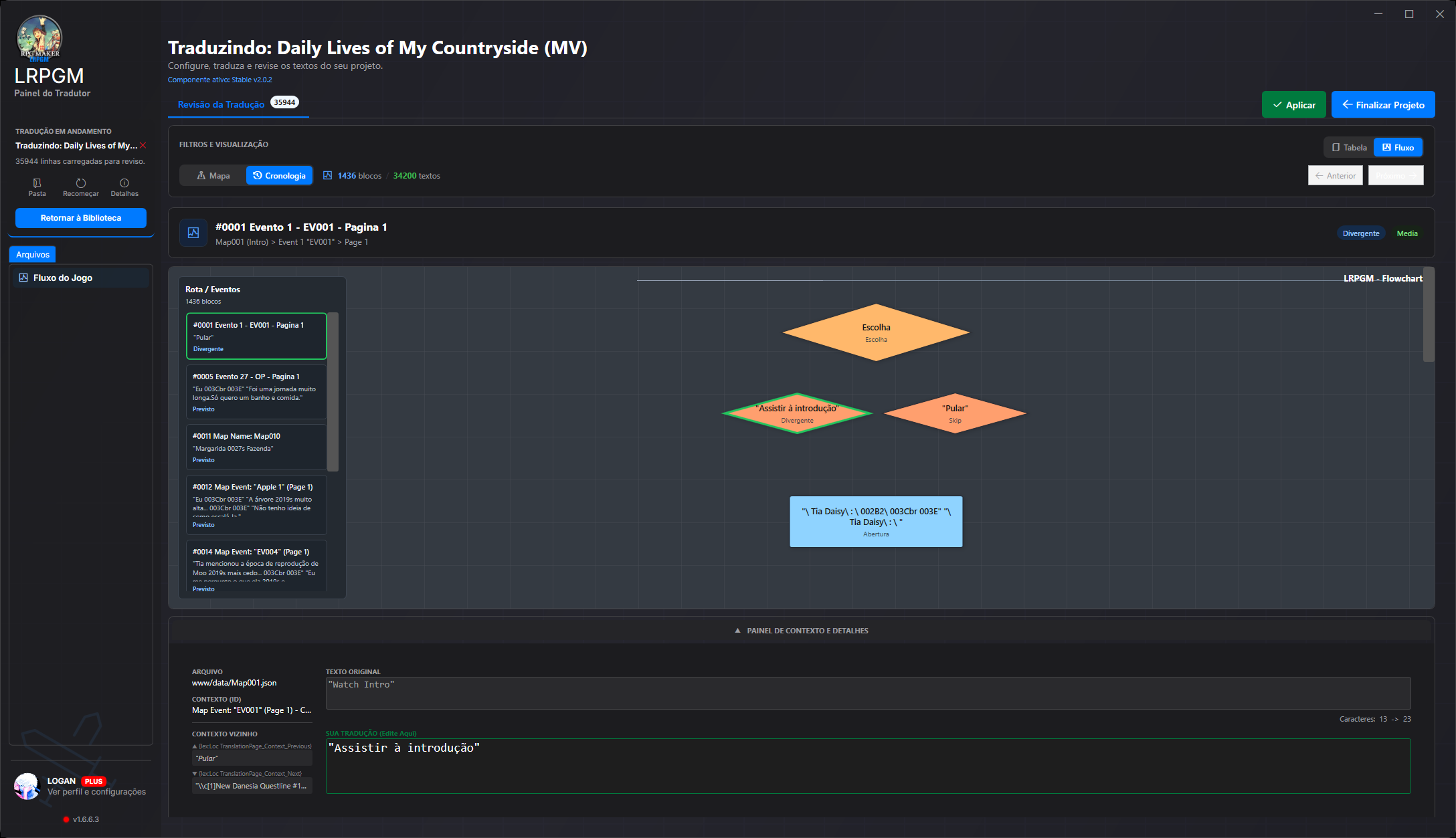
Dialogue stays connected to its scene
The reviewer brings together original text, translation, file, map, event and neighbouring text. Follow blocks in order or open the choice flowchart to understand what comes before and after each answer.
查看指南LRPGM · Translator++ · MTool
想用另一種語言玩遊戲,或仔細校對一份譯文?先依照遊戲類型和所需工具進行選擇。LRPGM 將引導式流程與針對 RPG Maker 結構設計的審校工具結合。
| 你的任務 | LRPGM專為 RPG Maker 打造 | Translator++ | MTool |
|---|---|---|---|
| 沒有翻譯經驗也能開始 | 新增執行檔。簡化模式會在同一應用程式中引導你選擇內容、語言和翻譯方式。 提供引導式流程,並可依需求使用進階選項。 | 建立專案並在格狀表格中編輯文字。準備過程會將擷取的資料放在暫存資料夾中。 實際情況:匯出或注入結果需要暫存資料夾;若遺失,就必須重建專案。 查看來源 · Translator++ · Staging Files | 將執行檔拖曳至 MTool,等待載入完成後選擇語言即可開始。 實際情況:載入可能需要一些時間,期間遊戲和工具可能暫時沒有回應。 查看來源 · MTool · Tutorial |
| 結合劇情脈絡審校 | 並排查看原文和譯文、來源檔案與事件、相鄰文字、地圖篩選、時間軸和選項流程圖。 完善譯文時,可同時查看場景順序和分支。 | 編輯格狀表格提供譯文欄和脈絡,可顯示每段文字的位置。 實際情況:脈絡的格式和範圍會因解析器與引擎而異。 查看來源 · Translator++ · Context | 載入翻譯檔案、匯出原文,然後開啟結果編輯選項。 實際情況:所示流程主要針對已載入的結果進行審校;LRPGM 也提供視覺化事件導覽。 查看來源 · MTool · Tutorial |
| 將譯文套用至遊戲 | 譯文會以獨立資料保存。對於 MV/MZ,外掛會在執行時整合文字;應用程式負責安裝和還原。 整合會新增執行環境並更新其登錄資訊;MV/MZ 文字資料庫不會被改寫成修補檔。 | 在 RPG Maker 修補流程中,匯出檔案並將其套用至遊戲的 Data 資料夾。 實際情況:此流程會取代資料檔案;若遊戲使用 RGSS 封存檔,則需在套用前處理該封存檔。 查看來源 · Translator++ · Patching | 透過 MTool 的流程開啟遊戲,並可在工具中載入翻譯資料。 實際情況:MTool 也支援離線使用已完成的譯文。LRPGM 的執行條件取決於模式和方案。 查看來源 · MTool · Engines & offline |
| 準備分享譯文 | 分享功能會準備本機 MV/MZ 封裝、檢查完整性,並讓你選擇受保護的散布方式或審校資料。 Plus 支援自訂署名和圖示。需要符合條件的專案和線上付費帳戶;不包含代管服務。 | 接收者可以套用匯出的修補檔。 實際情況:接收者需要套用這些檔案,並考量遊戲結構和封存配置。 查看來源 · Translator++ · Patching | 此流程包括載入翻譯檔案並匯出原文以供翻譯。 實際情況:載入翻譯檔案與準備包含署名和編輯規則的散布封裝並不相同。 查看來源 · MTool · Tutorial |
| 選擇 RPG Maker 工具 | 專為 RPG Maker 設計的流程:讀取 JSON、Ruby Marshal 和可識別的封裝結構,並支援地圖與事件審校。 主要面向 RPG Maker。相容性和使用權限取決於格式和方案。 | 支援多種引擎,並針對不同格式提供相應的解析器和整合功能。 實際情況:某些引擎需要載入擴充功能。建立專案時可能會啟動第三方工具來擷取和匯入文字。 查看來源 · Translator++ · Starting a project | 支援 RPG Maker 以及 Wolf RPG、Ren’Py 和 Kirikiri 等其他系列。 實際情況:多種引擎支援適合遊玩不同平台作品的玩家;可用功能取決於引擎和使用權限。 查看來源 · MTool · Engines & offline |
The reviewer brings together original text, translation, file, map, event and neighbouring text. Follow blocks in order or open the choice flowchart to understand what comes before and after each answer.
查看指南In MV/MZ, analysis follows text references and uses, separates candidates from technical values and shows a confidence score. High-confidence candidates can be preselected; inspect their origin, adjust filters and decide what to translate.
查看指南Recognised variables, formatting codes and markers are protected before text reaches the translation service. LRPGM validates and restores these elements in the result, reducing manual command repairs.
查看指南A plugin may use the same name for a button and an image or audio file. In MV/MZ, the resource corrector can recover the original name during loading using the file index and translation pairs. Images and audio retain their original file names.
查看指南Create a local package from an eligible MV/MZ project. Choose protected distribution, which blocks editing in LRPGM, or preserve review data for teamwork. Integrity checks detect changes to protected content; Plus lets you customise package credits and its icon.
查看指南The MV/MZ runtime provides a translation menu with font, size and line-wrapping options. In eligible modes, switch between original and translated text and adjust reading without returning to the editor. Free Runtime restricts these options.
查看指南Coverage depends on the engine, plugins and plan. Resource reference correction needs a file index and a translation match; it does not recreate missing files. Local sharing requires a translated, intact MV/MZ project, an unprotected source and an online base paid Basic or Plus account. Editing protection does not prevent copying the package or replace the game author’s rights.
RPG Maker 的結構貫穿整個流程:擷取、設定、翻譯、審校和套用。簡化模式協助新手入門;地圖、事件、詞彙表和外掛分析則支援在同一應用程式中仔細審校。
以上說明針對連結中的工作流程,並未涵蓋每個工具的所有模式。Translator++ 還提供程式碼保護和脈絡功能;MTool 支援離線使用已完成的譯文。功能、方案和要求可能變動,請確認你將使用的版本。
LRPGM 將引導式入門與地圖、事件、相鄰文字、時間軸和流程圖審校結合。MV/MZ 外掛分析會為候選文字分類並顯示信心分數,翻譯時也會保護已識別的指令。
符合條件的 MV/MZ 專案可透過 LRPGM 分享功能產生本機封裝。需要完整且未受保護的來源專案,以及線上付費 Basic 或 Plus 帳戶。Plus 支援自訂署名和圖示。受保護的散布會限制透過 LRPGM 編輯並檢查完整性,但無法阻止複製封裝。
請檢查遊戲引擎、方案功能和翻譯服務需求。LRPGM 的 MV/MZ Free Runtime 需要保持應用程式開啟並在線。自訂外掛和封裝格式取決於結構是否可識別;信心分數不保證涵蓋所有文字。