
Dialogue stays connected to its scene
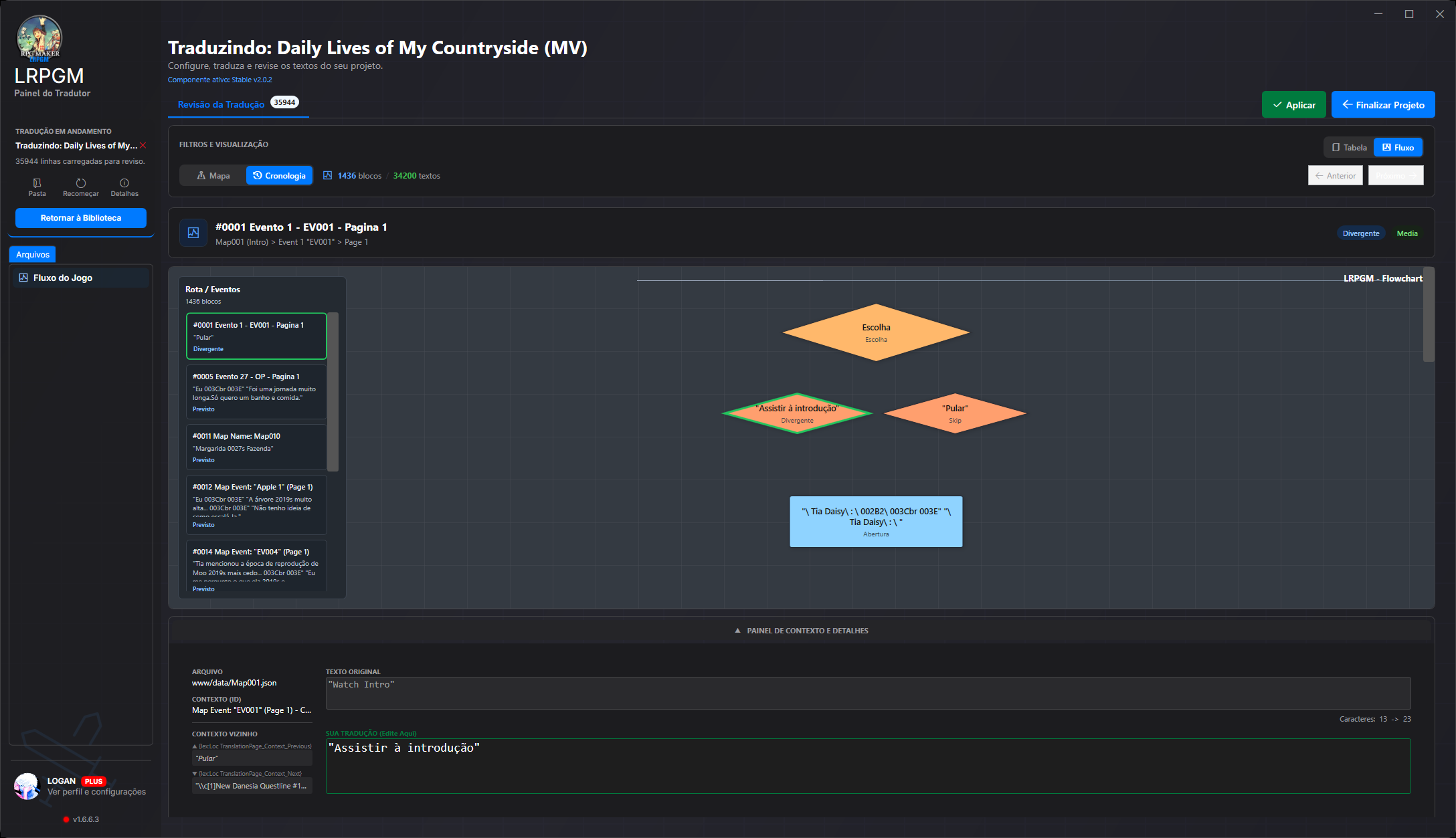
The reviewer brings together original text, translation, file, map, event and neighbouring text. Follow blocks in order or open the choice flowchart to understand what comes before and after each answer.
안내 보기LRPGM · Translator++
Translator++는 격자 편집과 다양한 엔진을 지원하는 번역 환경입니다. RPG Maker 프로젝트에서 LRPGM은 텍스트 비교에 맵, 이벤트, 이야기 선택지를 연결합니다. 간편 모드로 시작한 뒤 같은 프로젝트에서 검토를 더 깊게 진행할 수 있습니다.
| 작업 | LRPGMRPG Maker에 맞춤 | Translator++ |
|---|---|---|
| 번역 경험 없이 시작 | 실행 파일을 추가하세요. 간편 모드는 같은 앱에서 콘텐츠, 언어 및 번역 선택을 안내합니다. 필요할 때 고급 옵션을 사용할 수 있는 안내형 경로입니다. | 프로젝트를 만들어 격자에서 텍스트를 편집합니다. 준비 과정에서는 추출한 데이터를 스테이징 폴더에서 사용합니다. 실제 사용 시: 내보내기 또는 삽입에는 스테이징 폴더가 필요합니다. 폴더를 잃으면 프로젝트를 다시 만들어야 합니다. 출처에서 보기 · Translator++ · Staging Files |
| 이야기 맥락과 함께 검토 | 원문과 번역을 나란히 확인하고 원본 파일 및 이벤트, 주변 텍스트, 맵 필터, 시간순 흐름, 선택지 흐름도를 볼 수 있습니다. 번역을 다듬으며 장면 순서와 분기를 확인하세요. | 번역 열과 각 텍스트의 위치를 보여 주는 맥락 정보가 있는 편집 격자입니다. 실제 사용 시: 맥락의 형식과 범위는 파서 및 엔진에 따라 달라집니다. 출처에서 보기 · Translator++ · Context |
| 게임에 번역 적용 | 번역은 별도의 데이터로 보관됩니다. MV/MZ에서는 플러그인이 실행 중 텍스트를 통합하며 앱이 설치 및 되돌리기를 처리합니다. 통합 과정에서 런타임이 추가되고 등록 정보가 갱신됩니다. MV/MZ 텍스트 데이터베이스를 패치처럼 다시 작성하지는 않습니다. | RPG Maker 패치 흐름에서는 파일을 내보내 게임의 Data 폴더에 적용합니다. 실제 사용 시: 이 작업 흐름은 데이터 파일을 교체하며 RGSS 아카이브가 있는 게임은 적용 전에 아카이브를 처리해야 합니다. 출처에서 보기 · Translator++ · Patching |
| 공유할 번역 준비 | 공유 기능은 로컬 MV/MZ 패키지를 준비하고 무결성을 확인하며 보호 배포 또는 검토용 데이터 중에서 선택할 수 있게 합니다. Plus에서는 크레딧과 아이콘을 맞춤 설정할 수 있습니다. 지원되는 프로젝트와 유료 온라인 계정이 필요하며 호스팅은 포함되지 않습니다. | 번역을 받은 사람이 내보낸 패치를 적용할 수 있습니다. 실제 사용 시: 받는 사람이 파일을 적용하고 게임 구조 및 아카이브 형식을 고려해야 합니다. 출처에서 보기 · Translator++ · Patching |
| RPG Maker 도구 선택 | RPG Maker에 특화된 작업 흐름으로 JSON, Ruby Marshal, 인식된 패키징 구조를 읽고 맵과 이벤트를 검토합니다. RPG Maker에 중점을 둡니다. 호환성과 이용 권한은 형식 및 요금제에 따라 달라집니다. | 여러 엔진을 지원하며 형식별 파서 및 통합 기능을 제공합니다. 실제 사용 시: 일부 엔진은 애드온이 필요합니다. 프로젝트를 만들 때 텍스트 추출 및 가져오기를 위해 타사 도구가 실행될 수 있습니다. 출처에서 보기 · Translator++ · Starting a project |
The reviewer brings together original text, translation, file, map, event and neighbouring text. Follow blocks in order or open the choice flowchart to understand what comes before and after each answer.
안내 보기In MV/MZ, analysis follows text references and uses, separates candidates from technical values and shows a confidence score. High-confidence candidates can be preselected; inspect their origin, adjust filters and decide what to translate.
안내 보기Recognised variables, formatting codes and markers are protected before text reaches the translation service. LRPGM validates and restores these elements in the result, reducing manual command repairs.
안내 보기A plugin may use the same name for a button and an image or audio file. In MV/MZ, the resource corrector can recover the original name during loading using the file index and translation pairs. Images and audio retain their original file names.
안내 보기Create a local package from an eligible MV/MZ project. Choose protected distribution, which blocks editing in LRPGM, or preserve review data for teamwork. Integrity checks detect changes to protected content; Plus lets you customise package credits and its icon.
안내 보기The MV/MZ runtime provides a translation menu with font, size and line-wrapping options. In eligible modes, switch between original and translated text and adjust reading without returning to the editor. Free Runtime restricts these options.
안내 보기Coverage depends on the engine, plugins and plan. Resource reference correction needs a file index and a translation match; it does not recreate missing files. Local sharing requires a translated, intact MV/MZ project, an unprotected source and an online base paid Basic or Plus account. Editing protection does not prevent copying the package or replace the game author’s rights.
표 형식 검토는 문장 버전을 비교하는 데 유용합니다. LRPGM에서는 맵을 열고 이벤트 시간순을 살펴보며 선택지 분기를 확인할 수도 있습니다. 이 맥락을 통해 문자열만으로 장면을 재구성하지 않고도 답변의 의미를 검토할 수 있습니다.
위 내용은 링크된 작업 흐름에 대한 설명이며 각 도구의 모든 모드를 다루지는 않습니다. Translator++에는 코드 보호 및 맥락 기능도 있고 MTool은 완료된 번역을 오프라인에서 사용할 수 있습니다. 기능, 요금제, 요구 사항은 변경될 수 있으니 사용할 버전을 확인하세요.
LRPGM은 안내형 시작 과정과 함께 맵, 이벤트, 주변 텍스트, 시간순 검토, 흐름도 검토를 제공합니다. MV/MZ 플러그인 분석은 후보 텍스트를 분류하고 신뢰도 점수를 표시하며, 인식된 명령은 번역 중 보호합니다.
조건을 충족하는 MV/MZ 프로젝트는 LRPGM 공유 기능으로 로컬 패키지를 만들 수 있습니다. 원본이 온전하고 보호되지 않아야 하며, 유료 Basic 또는 Plus 계정으로 온라인 상태여야 합니다. Plus에서는 크레딧과 아이콘을 맞춤 설정할 수 있습니다. 보호 배포는 LRPGM 편집을 차단하고 무결성을 확인하지만 패키지 복사를 막지는 않습니다.
게임 엔진, 요금제 기능, 번역 서비스 요구 사항을 확인하세요. LRPGM MV/MZ Free Runtime은 앱을 열어 두고 온라인 세션을 유지해야 합니다. 사용자 지정 플러그인과 패키징 형식은 인식된 구조에 따라 달라지며, 신뢰도 점수가 모든 텍스트를 처리한다는 보장은 아닙니다.