
LRPGM · Skip to content / Ir para o conteúdo / Lewati ke konten

LRPGM · MTool

LRPGM vs MTool: from your first game to detailed review

MTool presents a load, translate and play workflow across several engine families. LRPGM also provides a simple start and adds a workspace for refining RPG Maker translations: maps, events, chronology and plugin text analysis in one app.

Compare how you start, review and share an RPG Maker translation.
Your taskLRPGMBuilt for RPG MakerMTool
Start without translation experience

Add the executable. Simplified mode guides content, language and translation choices in the same app.

A guided path with advanced options when you need them.

Drop the executable into MTool, wait for loading and choose languages to begin.

In practice: Loading can take time and temporarily leave the game and tool unresponsive.

View at source · MTool · Tutorial
Review with story context

Original and translation side by side, source file and event, neighbouring text, map filters, chronology and choice flowchart.

See the scene sequence and branches while refining the translation.

Load a translation file, export original text and open the result-editing option.

In practice: The presented workflow centres review on loaded results; LRPGM also provides visual event navigation.

View at source · MTool · Tutorial
Apply translation to the game

Translation is kept in separate data. In MV/MZ, the plugin integrates text at runtime; the app handles installation and reversal.

Integration adds the runtime and updates its registration; MV/MZ text databases are not rewritten as a patch.

The game is opened through MTool’s workflow and can load translation data in the tool.

In practice: MTool also offers offline use of completed translations. LRPGM runtime conditions depend on mode and plan.

View at source · MTool · Engines & offline
Prepare a translation to share

A sharing action prepares the local MV/MZ package with integrity checks and a choice of protected distribution or review data.

Plus adds custom credits and icon. Requires an eligible project and a paid online account; hosting is not included.

The workflow includes loading a translation file and exporting original text for translation.

In practice: Loading a translation file differs from preparing a distribution package with credits and editing rules.

View at source · MTool · Tutorial
Choose a tool for RPG Maker

A workflow specialised in RPG Maker: reading JSON, Ruby Marshal and recognised packaged structures, with map and event review.

The focus is RPG Maker. Compatibility and access depend on format and plan.

Supports RPG Maker and other families such as Wolf RPG, Ren’Py and Kirikiri.

In practice: The range of engines suits players across platforms; available features depend on engine and access.

View at source · MTool · Engines & offline

Care that follows your translation

Dialogue stays connected to its scene

The reviewer brings together original text, translation, file, map, event and neighbouring text. Follow blocks in order or open the choice flowchart to understand what comes before and after each answer.

Read guide
Plugin text with guided selection

In MV/MZ, analysis follows text references and uses, separates candidates from technical values and shows a confidence score. High-confidence candidates can be preselected; inspect their origin, adjust filters and decide what to translate.

Read guide

Translate the sentence. Preserve its commands.

Recognised variables, formatting codes and markers are protected before text reaches the translation service. LRPGM validates and restores these elements in the result, reducing manual command repairs.

Read guide

Text changes. Resources stay in place.

A plugin may use the same name for a button and an image or audio file. In MV/MZ, the resource corrector can recover the original name during loading using the file index and translation pairs. Images and audio retain their original file names.

Read guide

Share a translation prepared for playing

Create a local package from an eligible MV/MZ project. Choose protected distribution, which blocks editing in LRPGM, or preserve review data for teamwork. Integrity checks detect changes to protected content; Plus lets you customise package credits and its icon.

Read guide

Adjust reading inside the game

The MV/MZ runtime provides a translation menu with font, size and line-wrapping options. In eligible modes, switch between original and translated text and adjust reading without returning to the editor. Free Runtime restricts these options.

Read guide

Coverage depends on the engine, plugins and plan. Resource reference correction needs a file index and a translation match; it does not recreate missing files. Local sharing requires a translated, intact MV/MZ project, an unprotected source and an online base paid Basic or Plus account. Editing protection does not prevent copying the package or replace the game author’s rights.

Start playing. Keep refining.

You may want to understand a game today and refine it later. LRPGM simplified mode guides your first processing; the reviewer keeps text connected to maps and events. With Basic and Plus, revisit an existing translation or extract new text while preserving earlier work.

LRPGM
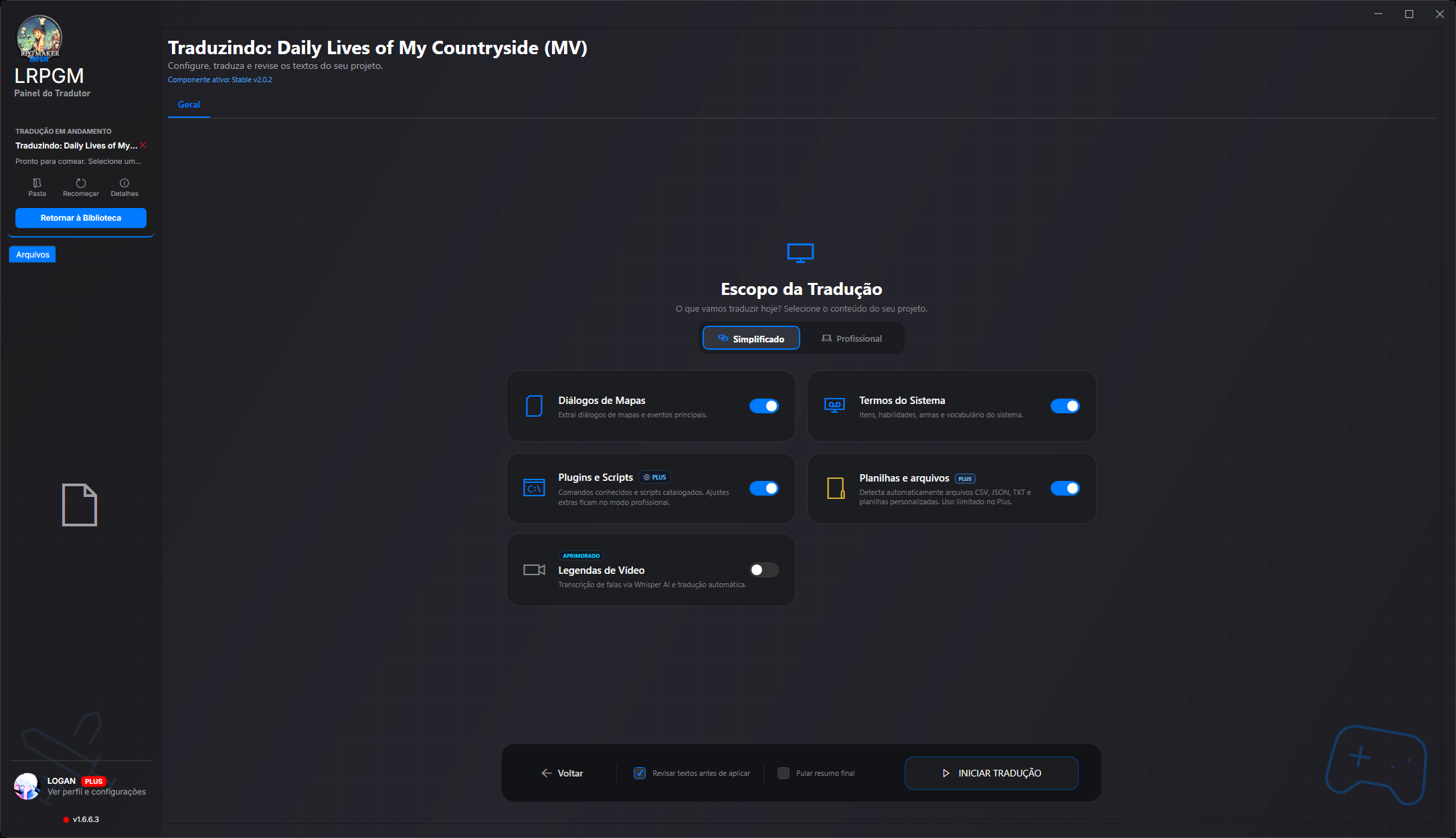
Simplified mode. Choose content by category: dialogue, system terms, plugins and additional files.
Choose content by category: dialogue, system terms, plugins and additional files.

Simplified mode

Choose content by category: dialogue, system terms, plugins and additional files.

Choose content by category: dialogue, system terms, plugins and additional files.

Compare each tool’s workflows

The considerations above concern the linked workflows, not every mode of each tool. Translator++ also offers code protection and context features; MTool allows offline use of completed translations. Features, plans and requirements may change. Check the version you will use.

Questions to help choose your tool

What makes LRPGM different for RPG Maker translation?

LRPGM combines a guided start with map, event, neighbouring text, chronology and flowchart review. MV/MZ plugin analysis presents classified candidates and confidence scores, while translation protects recognised commands.

Can I distribute my translation with credits?

Eligible MV/MZ projects can generate a local package through LRPGM sharing. An online base paid Basic or Plus account and an intact, unprotected source are required. Plus allows custom credits and icon. Protected distribution blocks LRPGM editing and checks integrity, but does not prevent package copying.

What should I check before choosing?

Check the game engine, plan features and translation service requirements. LRPGM MV/MZ Free Runtime requires the app open and an online session. Custom plugins and packaged formats depend on recognised structures; confidence scores do not guarantee coverage of every text.

Find your next step

You can change your choice anytime in the footer. Your preference stays in this browser for up to a year.

About cookies and storage
LRPGM vs MTool: from your first game to detailed review | LRPGM