
Table: compare and edit
Read original and translation side by side. Use search and filters to find a line, select it and edit in the context panel. It is a direct way to refine names, terminology, tone and small differences before applying.
LRPGM · RPG Maker
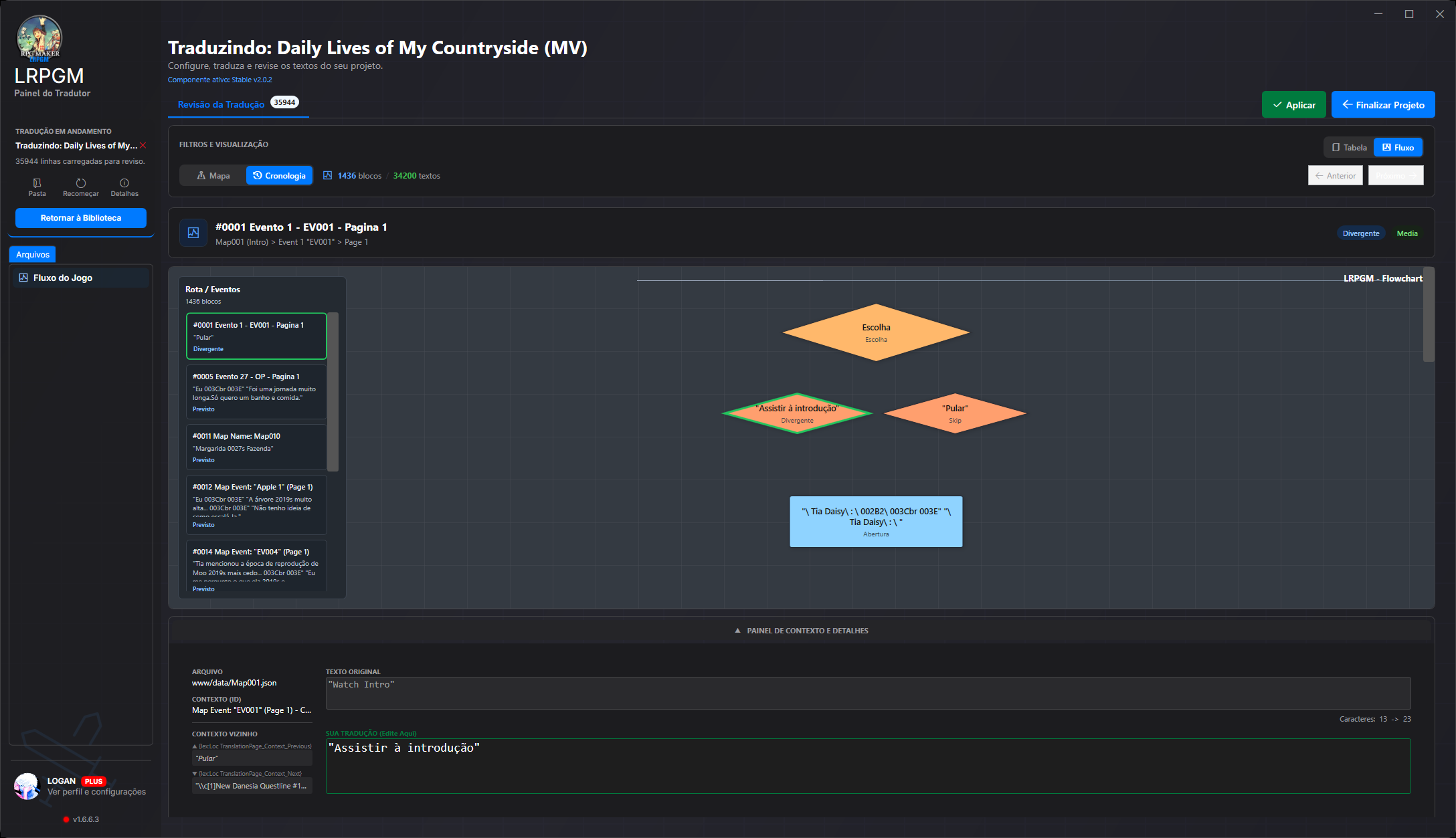
Translating a line is easier when you understand the scene. LRPGM brings together the original, translation and the text’s place in the game. Start with the table to check the result or open flow view to follow event sequences and choice branches.
Read original and translation side by side. Use search and filters to find a line, select it and edit in the context panel. It is a direct way to refine names, terminology, tone and small differences before applying.
Organize review by map file. Event and page references identify a line’s origin; nearby text helps you understand who is answering whom. Focus your review on a game area or scene.
Walk through the block sequence and move between events. This makes it easier to review a conversation as it unfolds, rather than relying only on text positions in a file.
The diagram shows connections between blocks and choice branches. See a decision’s alternatives, select text and inspect its context in the same reviewer. This helps preserve meaning between questions, answers and consequences.
For existing translations, Review and Update modes are available with Basic and Plus on eligible projects. Formatting codes and variables must stay intact: LRPGM handles these markers during processing, and the reviewer lets you check the result before applying.
No. Check an automatic translation and adjust a line using its context. If you already translate, use filters, event references and flow for a more detailed review.
The table makes it easy to compare original and translation and find text by file. Flow organizes blocks, shows diagram choices and supports map or chronology navigation. Both modes help review the same project.
Yes. With an eligible Basic or Plus project, return to Review mode to edit the existing translation. If new text is present, use Update to extract it while preserving earlier translations. Then check and apply the result.