
RPG Maker reviewer: translate in story context
Review RPG Maker translations by table, map and chronology. See choices in a flowchart, compare dialogue and edit in context with LRPGM.
Read guideLRPGM · Windows
Explore the flowchart reviewer, plugin analysis, simplified and professional modes and tools for translating RPG Maker games with LRPGM.
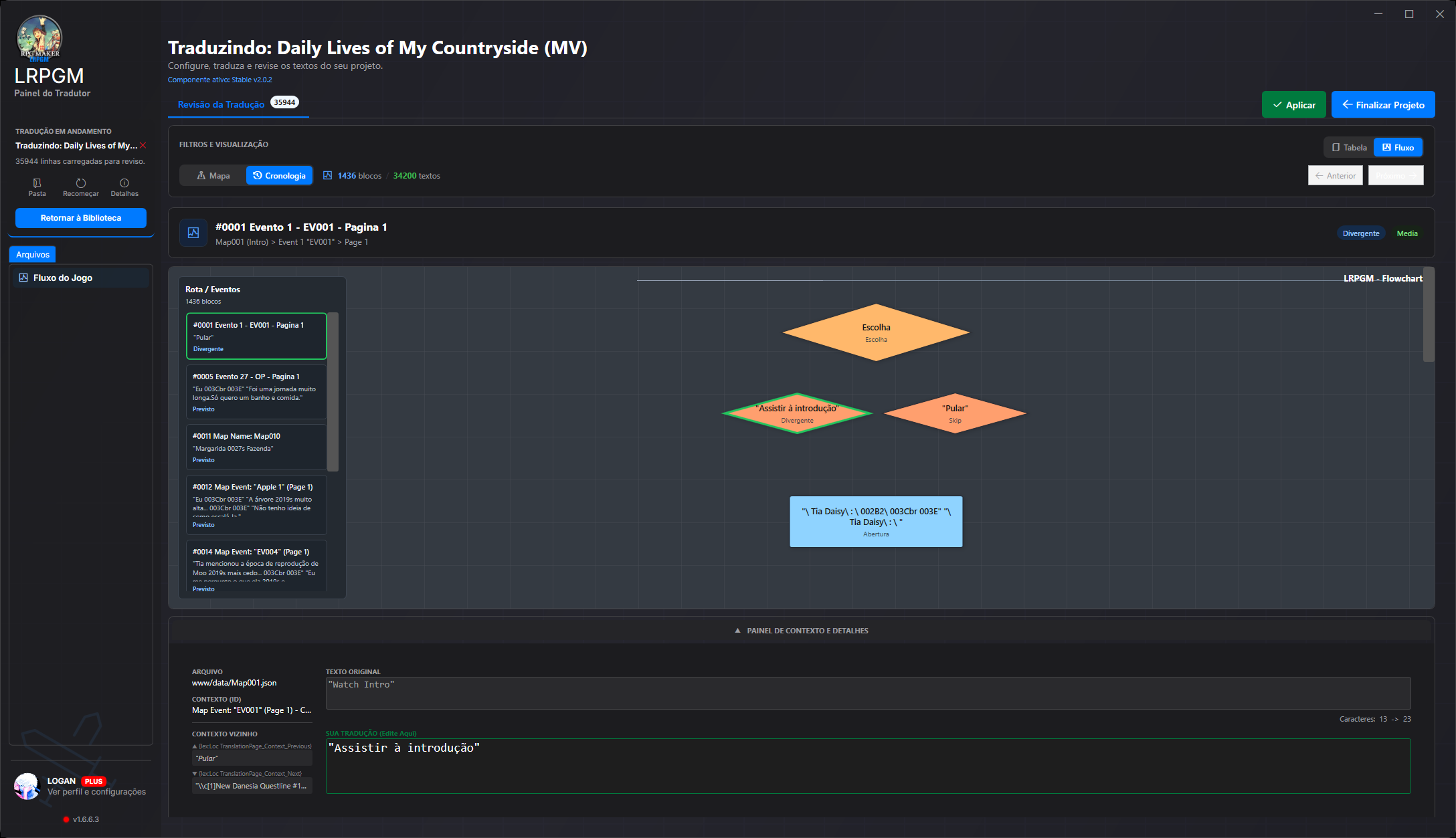
Review RPG Maker translations by table, map and chronology. See choices in a flowchart, compare dialogue and edit in context with LRPGM.
Read guideSee how LRPGM extracts and classifies MV/MZ plugin text, traces code usage and uses confidence scores and review to guide translation.
Read guideSee confidence, origin and discovered usage for each candidate. Check automatic selections and items that need your decision.
Read guideInclude TXT, CSV and custom JSON text through structured resource processing. Controls and limits follow your plan and project structure.
Read guideProcessing handles variables and formatting markers to preserve their role in the text. Check dialogue and codes in the reviewer before applying.
Read guideAdd recognized games and find your projects in the library. Free allows up to five active MV/MZ projects.
Read guideCheck files and groups before processing. Basic and Plus offer additional controls; structured resources have their own conditions.
Read guideCompare original and translation, find a scene by map and follow choices in the flowchart. Nearby dialogue stays with your edits to help preserve meaning.
Read guideUse glossaries with Basic and Plus. Basic allows two active pairs and up to five active automatic rules per pair.
Read guideReuse results when the cache and project state allow it. Retention and file changes can affect resuming.
Read guideLocal sharing for translated, intact MV/MZ projects with an unprotected source. Requires an online, base paid Basic or Plus account; hosting and public links are not included.
Read guideSimplified mode groups sources into easy categories. In professional mode, open map, common event, script and database options. Follow extraction in the stage panel and check detected language samples before translating.
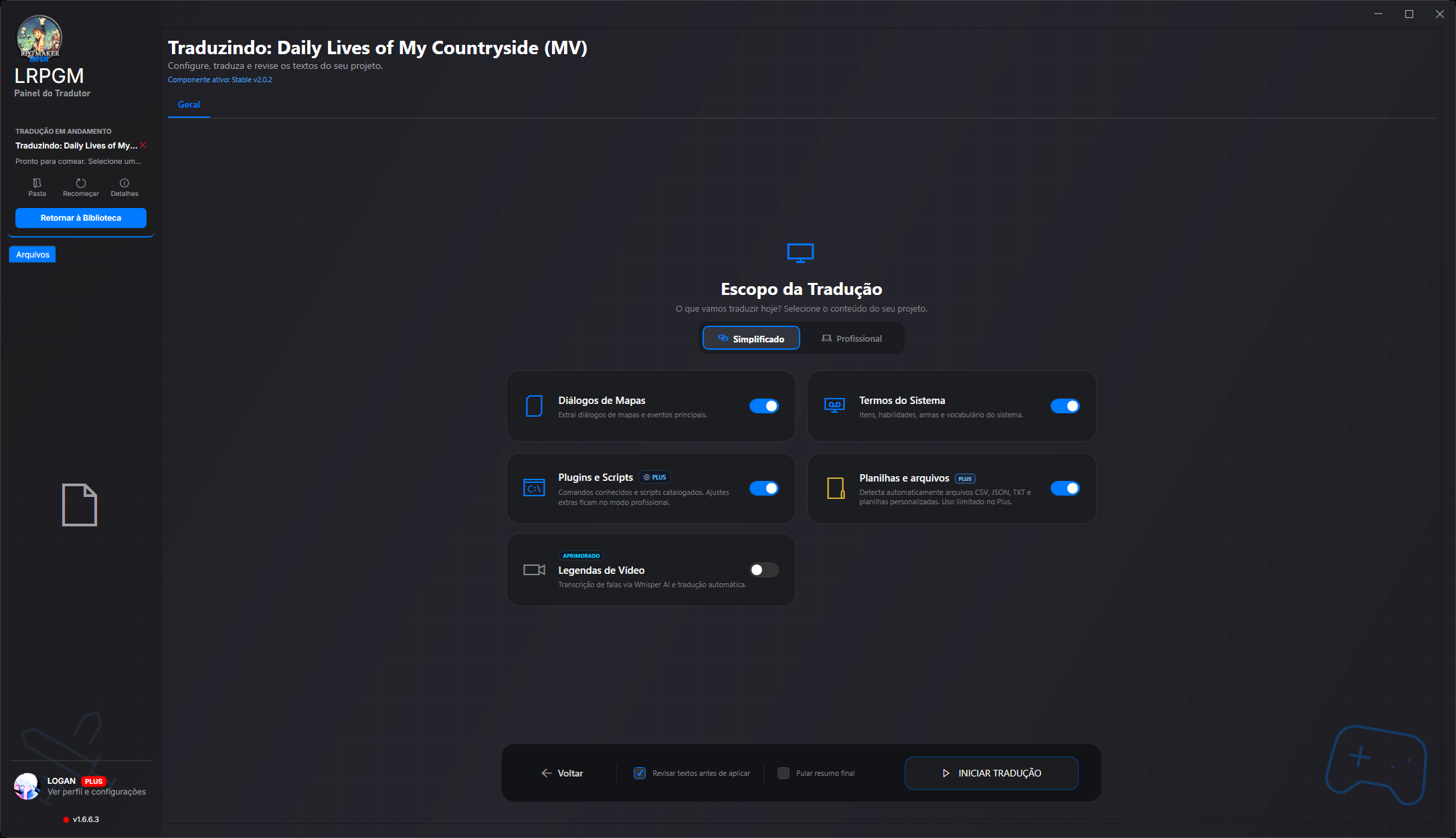
Advanced options depend on your plan and project. Compare plans to choose the access that fits your use.
Google V3 [LRPGM] and Google Old are available in all three plans. Bing, Azure, DeepLX and DeepL Free/Pro require online Plus access. The language catalog does not equal each provider’s coverage.
Providers may require their own account, key and payment. Integration does not include third-party credits or guarantee every language pair.
LRPGM is a Windows application that understands the formats of each RPG Maker generation. You work with text and context; the application handles reading and translation integration.
Maps, events, databases and plugins are read according to the game’s organization. Translation is stored separately and integrated into the LRPGM runtime through a plugin.
The reader recognizes Ruby Marshal and .rxdata, .rvdata and .rvdata2 formats. The Legacy runtime receives translation in its own file and integrates into scripts or the recognized RGSS archive.
Content in TXT, CSV and custom JSON can enter the extraction workflow. Plugin analysis helps recognize player-facing text even outside standard RPG Maker fields.
MV/MZ content in recognized EVB containers is accessed through a virtual file system. RGSS formats and Legacy paths have specialized handling. Compatibility depends on the format and structure present in the game.
The reviewer brings together original text, translation, file, map, event and neighbouring text. Follow blocks in order or open the choice flowchart to understand what comes before and after each answer.
Read guideIn MV/MZ, analysis follows text references and uses, separates candidates from technical values and shows a confidence score. High-confidence candidates can be preselected; inspect their origin, adjust filters and decide what to translate.
Read guideRecognised variables, formatting codes and markers are protected before text reaches the translation service. LRPGM validates and restores these elements in the result, reducing manual command repairs.
Read guideA plugin may use the same name for a button and an image or audio file. In MV/MZ, the resource corrector can recover the original name during loading using the file index and translation pairs. Images and audio retain their original file names.
Read guideCreate a local package from an eligible MV/MZ project. Choose protected distribution, which blocks editing in LRPGM, or preserve review data for teamwork. Integrity checks detect changes to protected content; Plus lets you customise package credits and its icon.
Read guideThe MV/MZ runtime provides a translation menu with font, size and line-wrapping options. In eligible modes, switch between original and translated text and adjust reading without returning to the editor. Free Runtime restricts these options.
Read guideCoverage depends on the engine, plugins and plan. Resource reference correction needs a file index and a translation match; it does not recreate missing files. Local sharing requires a translated, intact MV/MZ project, an unprotected source and an online base paid Basic or Plus account. Editing protection does not prevent copying the package or replace the game author’s rights.