
LRPGM · Skip to content / Ir para o conteúdo / Lewati ke konten
Explore features

LRPGM · RPG Maker

RPG Maker plugin translation with context analysis

A quoted word can be a player message, image name or internal setting. Translating everything without distinguishing these uses can change game logic. LRPGM analyzes where plugin text appears and how it is used to help you choose what should be translated.

LRPGM
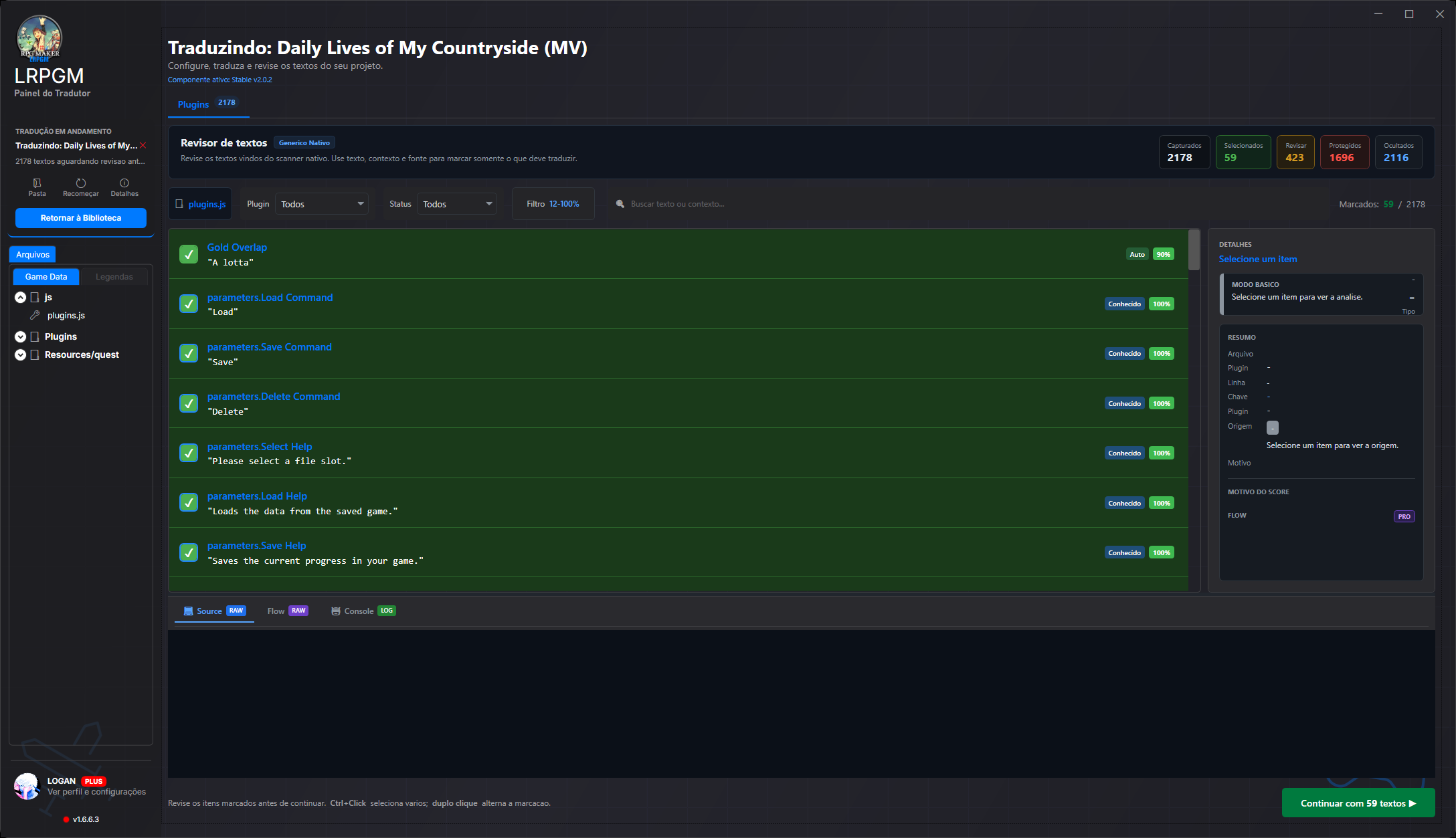
Plugin text. Classified text, automatic selection and confidence scores. Open the details to understand each classification.
Classified text, automatic selection and confidence scores. Open the details to understand each classification.

Plugin text

Classified text, automatic selection and confidence scores. Open the details to understand each classification.

Classified text, automatic selection and confidence scores. Open the details to understand each classification.

How this helps your translation

1. Find text sources

MV/MZ processing reads active plugins, their parameters and scripts. Known plugins have specific handling; custom plugin analysis finds candidates and references. TXT, CSV and custom JSON files can also enter through structured resource processing.

2. Trace code usage

Analysis connects parameter descriptions and plugin information with variables, references and JavaScript calls. The discovered flow helps identify when a string reaches a display function, or serves as code, a setting or a resource.

3. Classify with confidence

The reviewer shows a confidence score, origin and classification reason. Known fields and high-confidence candidates can be selected automatically. Items needing human judgment remain available for review; technical values are treated as protected.

4. Decide and continue

Filter by plugin, status and confidence range. Search text or context, open details and inspect traced usage before selecting. If you find a missed message, review its selection and continue through the appropriate project workflow.

A workflow that keeps you in control

ExtractionUsage and contextClassificationYour review

Free uses a safe extraction profile with known commands and plugins. Basic advanced analysis depends on the quota available to the account; Plus does not use that processing quota. Structured resources have their own plan conditions. Obfuscated scripts can prevent complete tracing: available parameters and headers help analysis in those cases. Check project options and each candidate’s details.

Questions about this feature

What does the plugin reviewer percentage mean?

It is a text classification confidence score based on signals found during analysis. It helps decide whether an item is translatable text or a technical value. It is not a translation quality measure or a guarantee that the text appears in every playthrough.

Does LRPGM translate custom plugins?

LRPGM analyzes custom MV/MZ plugins and presents discovered candidates for selection and review. Results depend on structure and text usage. Inspect context, score reasons and available flow without selecting every string in the file.

How do I translate a missed message?

Find the message in the plugin reviewer, check filters and item status, and examine its details before selecting it. Basic and Plus review and update modes let you continue an eligible project while preserving earlier translations. After applying, test the scene using that message.

Keep exploring LRPGM

You can change your choice anytime in the footer. Your preference stays in this browser for up to a year.

About cookies and storage
RPG Maker plugin translation with context analysis | LRPGM